

Session Details
Clicking View Details opens a detailed view of the selected session.
This page provides full transparency into the session's lifecycle, activity, and technical data, and is primarily used for support, debugging, and security investigation.
Session Overview
The Session Overview section summarizes the current state of the session.
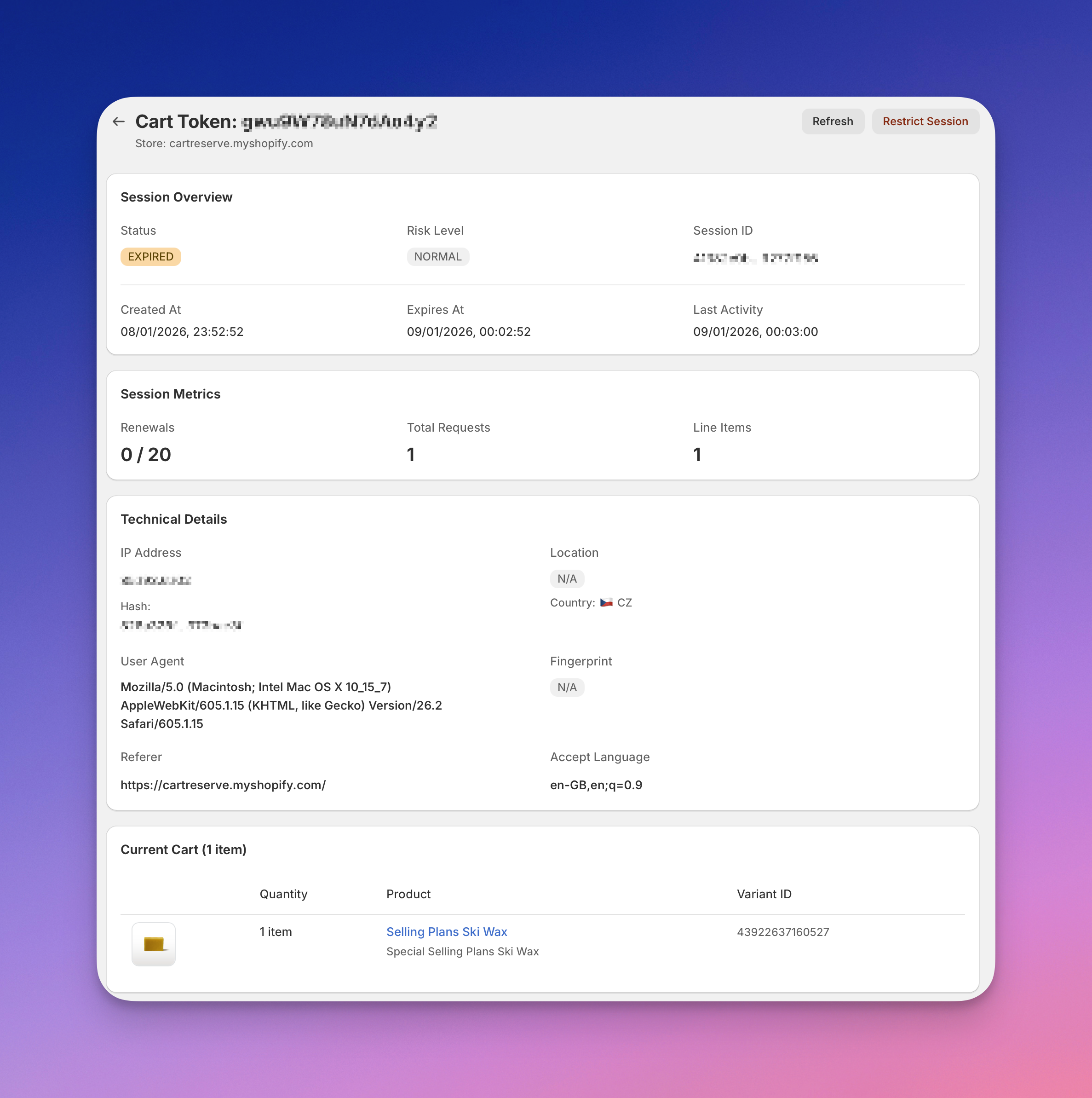
Header Information
-
Cart Token Unique identifier displayed in the page header.
-
Store The Shopify store domain associated with the session.
-
Status Badges Two badges indicate the session state:
- Session status (Active, Expired, Converted, Cancelled)
- Risk level (Normal, Monitored, Review, Restricted)
-
Token Hash Truncated internal hash identifier for the session.
Cart Value
Displays the total monetary value of items in the cart at the current session state.
Timestamps
-
Created When the session was first created, shown as relative time and exact date.
-
Expires When the reservation expired or is scheduled to expire.
-
Last Activity Most recent interaction within the session.
Action Buttons
-
Refresh Reloads the session data.
-
Restrict Session Manually restricts the session if suspicious behavior is detected.
Session Metrics
The Session Metrics panel provides key numerical indicators related to the session.
-
Country Customer's geographic location displayed with a flag icon.
-
Products Number of items currently in the cart.
-
Cart Updates Total number of cart modifications during the session.
-
Renewals Number of automatic renewals used compared to maximum allowed (e.g., 0/20).
-
Manual Extends Number of manual timer extensions requested by the customer.
-
Duration Total session time from creation to current state or expiration.
Security Analysis
The Security Analysis panel provides AI-powered fraud detection and risk assessment for each session.
Status Badge
The panel header shows the current security status:
- Monitored — session is being tracked for suspicious patterns
- Normal — no security concerns detected
- Review — requires manual review
- Restricted — session has been blocked
Bot Detection
Automated analysis of session behavior patterns to identify automated or bot-like activity.
- OK — likely legitimate human behavior with minor or no anomalies
- Warning — some anomalies detected that may warrant attention
- Blocked — automated or bot behavior detected
Click View details for expanded bot detection analysis including specific signals detected.
AI Analysis
AI-powered fraud risk assessment that analyzes session patterns and behaviors.
Risk levels are displayed with color-coded badges:
- Low Risk (green) — normal behavior patterns, no concerns
- Medium Risk (yellow) — some concerning signals detected
- High Risk (red) — suspicious behavior patterns identified
The AI provides specific insights about detected risks, such as:
- Known fraud IP addresses
- Unusual expiration patterns
- Fast single-action behavior
- Checkout behavior anomalies
- Geographic or device inconsistencies
Each analysis includes the timestamp when it was performed.
Re-analyze
- Re-analyses counter — shows remaining re-analyses available (e.g., 0/3)
- Re-analyze button — request a fresh AI analysis of the session
Use re-analysis when session behavior has changed or when investigating specific concerns.
Technical Details
This section is collapsed by default. Click Show to expand.
Contains low-level technical information used for security analysis and debugging:
- IP Address — client IP address
- Location / Country — geographic location derived from session data
- User Agent — browser and operating system information
- Fingerprint — session fingerprint, if available
- Hash — internal session hash identifier
- Referrer — source URL that initiated the session
- Accept Language — browser language settings
Current Cart
Displays the current contents of the cart at the time of the last session update.
For each item, the following information is shown:
- Quantity — reserved quantity
- Product — product name with link to product details
- Variant ID — Shopify variant identifier
If no items are present, the cart appears empty.
Session Timeline
The Session Timeline provides a chronological record of all significant events that occurred during the session.
It allows you to trace how the cart and reservations evolved over time.
Timeline Header
Shows the total number of updates (e.g., "1 Updates").
Timeline Events
Each event displays:
- Event Type — badge indicating the action (e.g., Session Created, Cart Updated, Renewed)
- Timestamp — exact date and time when the event occurred
- Item Count — number of cart items and total value at that point
Event Details
Click the expand arrow to view the cart state at that specific moment:
- Quantity — number of units reserved at the time
- Product — product name
- Variant ID — Shopify variant identifier
This makes it easy to understand which products were affected by a specific action and how quantities changed throughout the session lifecycle.